

I’d like to think that I’m reasonably proficient with the technical bits that make the magic of the web server come alive.
After thirty plus years in IT with several websites that have gone through more than a few technological iterations, I really ought to be.
That’s why I wasn’t particularly concerned when I saw the site health report that said they didn’t like the version of PHP I was rocking so I figured I’d bop on over to the server’s control panel and change it to something a wee bit more modern so I picked PHP 8.5.
Easy peasy.
At first, nothing seemed amiss as I was able to log into the site administration pages and clone a new draft post, throw a picture of Bon Jovi’s “Slippery When Wet” album into the featured image and then kicked the preview.
That’s when everything started going to hell in a handbasket because the page timed out before it could render.
In technical terms, that not only royally sucks rocks…it’s also exceptionally rare as the server is generally rather speedy in rendering complex pages and this empty post was anything but!
A little digging about and I discovered to my horror that the ImageMagick extension is rather dodgy in versions of PHP after 8.3.
Ah, OK…let’s kick it back down to PHP 8.3 which is still better than the soon-to-be-dead PHP 8.1 and it should be happy enough with that as Red Vixen Studios was already moved to PHP 8.3 over the weekend and didn’t have any problems other than finding out that the Imagely NextGen Lightroom plug-in isn’t quite as robust at creating galleries on the server from Lightroom as it once was.
At least I had the workaround of creating the galleries directly on the server itself which I’d mirror in Lightroom so I could quickly find the pictures in a given gallery.
Annnnnnnnnnnnd…the site is still not rendering posts but the administration pages were working which just added to my confusion.
A peek at the server logs showed a bunch of database transactions failing badly (mostly database operations being done in an improper order) so my next thought was that I had a bit of corruption in the database and I’d hit the “repair database” button in the control panel to sort it.
That didn’t work and now the database is well and truly hosed and this is the point where I’m truly getting scared that I’m looking at a full-blown server rebuild I really don’t want to do.
So let’s check the backups and see if I’ve got a good backup and yay…yes I do! Too bad it’s from the first of August and I’ve done a lot of content since then… 🙁
I end up exporting the WordPress data (which seems a bit of unholy magical incantations given how unhappy the database was!) and backed up the changed/new files by patching a local copy of the server files to prepare for the worst-case scenario.
It’d suck to have to rebuild the WordPress server but it was now at least plausible as well as completely painful.
I was already all-in on being an apocalyptic imbecile and then my “old school database administrator” instincts kick in and I figured I had the database data so I’d just drop the database and database user and then recreate them and reload the data the way I’ve done across many database management systems over the decades.
It might well have worked had the database DROP command actually ran to completion but Comrade Murphy reared his ugly head and decreed that the database drop would only be partially successful.
As I’m mucking about trying to salvage the site’s data, I find that the control panel has a Jetbackup5 installation and I’ve got thirty days of file and database backups including one taken automatically just after midnight!
So I figured I’d download their copy of the database data just in case and then tell Jetbackup to restore those midnight backups of the database and database user.
It seemed to work well…that is until the actual database restore itself died with a message indicating a partial failure in restoring the database with absolutely no indication as to *WHAT* had failed and the retry button it offered also failed to work which I suspect was due to the partially dropped database debris I suspected was still on the server.
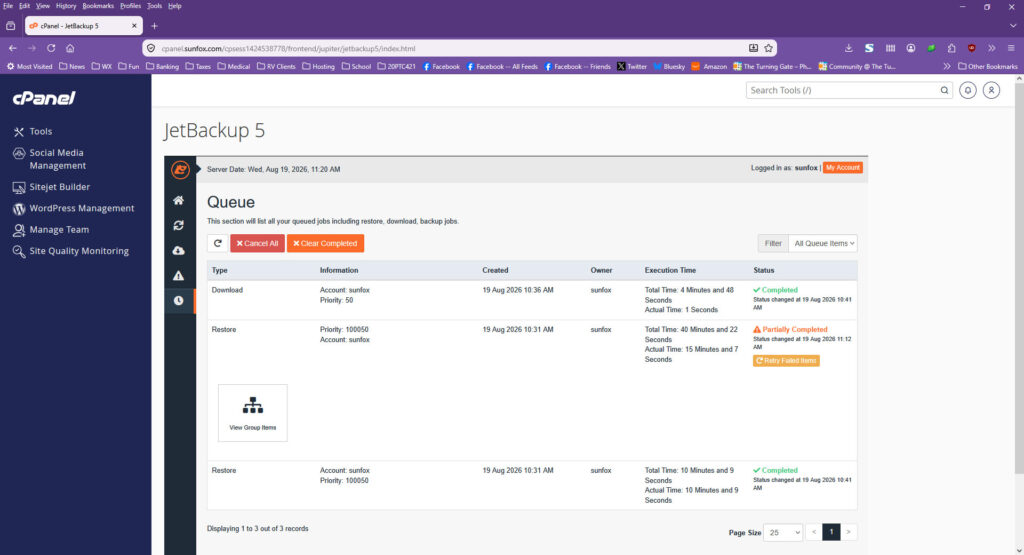
That’s not good. That’s not good *AT ALL*.
That is when I finally put my pride to the side and waved the white flag and put in a ticket with Shock Hosting begging them to clear out the old database files, reset the database back to a pristine state, and then reload the midnight copy of the database backups because it clearly wasn’t going to do it for me.
My hope was that because the actual files (like pages and images and whatnot) was fine on the server, we should be able to get away with just restoring the database and WordPress would be none the wiser with the only data loss being a post I’d cloned and added a feature image to that I could do again in about a minute if the server started working again.
I’m not totally sure what they did but two hours later, the site was rendering posts/pages again as it should.
I’m sure my monkeying round with the PHP configuration wasn’t helpful but it turned out that Imagely had dropped a new version of the NextGen Gallery plug-in code and it’d been automatically loaded and activated and that was what was breaking the site.
I wish I could say that I figured that one out but it was actually the wizard in technical support who deduced what the weird database statement failures in the logs really meant and suggested deactivating the Imagely plug-ins and seeing what would happen.
Once the NextGen plug-ins were deactivated, pages started (mostly) rendering with the only breakage being Imagely galleries not rendering because the plug-in had effectively disappeared.
I then reactivated the NextGen plug-ins and the pages continued rendering as they ought to but as a precaution, I’ve taken them off of the automatic update scheme now that I’ve got a working configuration.
As you might imagine, I kicked off a quick backup of the now properly functioning website and the underlying database and figured I’d leave things to settle down a bit before getting to the posts I was wanting to write.
So far, so good.
Of course, you’d have thought that I would have learnt my lesson from this morning but it turns out that WordPress 7.1 dropped sometime this afternoon and I went ahead and kicked off that upgrade. 😉
You know engineers…they’re always changing things!
But hats off to Shock Hosting’s technical support…very quick, very efficient, clearly explained what was going on including some of the stuff I couldn’t see behind the scenes, and most importantly got the site back amongst the living a lot quicker than my stupidity really deserved!
I wasn’t exactly planning on running a disaster-recovery exercise today.
But at least I know that should the worst possible catastrophe occur to the site, I’ve got a recovery plan that works which at least staves off the apocalypse for a bit longer and technical support that knows what they’re doing when I get stupid and make a complete mess of things! 🙂
Speaking of backups… 😉